
Hide/Show the code
import numpy as np
x = np.random.normal(0, 1, 10)
xarray([-0.86705152, -0.52845241, -0.9562521 , 0.58610836, -1.87132179,
0.81412207, 0.93814982, -1.14123728, 1.09981145, 0.03483234]) Template for contribution to Computo
Example dedicated to Python users
 ISSN 2824-7795


Template for preparing a submission to Computo, using the quarto journal extension, the Jupyter kernel (Python user) and the environment files to set-up the dependencies. For a detailed, step-by-step guide on preparing your article, setting up the continuous integration and submitting it to Computo, please consult the guidelines for authors.
This document, accompanied by the customized GitHub repository, provides a template for writing contributions to Computo (Computo Team 2020).
This document provides only the key formatting principles. For a detailed, step-by-step guide on preparing your article and submitting it to Computo, please consult the guidelines for authors.
Quarto is a versatile formatting system for authoring documents integrating markdown, LaTeX and code blocks interpreted either via Jupyter or Knitr (thus supporting Python, R and Julia). It relies on the Pandoc document converter.
You need quarto installed on your system and the Computo extension to prepare your document. For the latter, once quarto is installed, run the following to install the extension in the current directory (it creates a _extension directory which is ignored by git thanks to .gitignore by default):
quarto add computorg/computo-quarto-extensionThis section covers basic formatting guidelines for quarto documents.
To render a document, run quarto render. By default, both PDF and HTML documents are generated:
quarto render # renders both HTML and PDFTo check the syntax of the formatting below, you can use the </> source button at the top right of this document.
Bold text or italic
But we can also do a numbered list
LaTeX code is natively supported1, which makes it possible to use mathematical formulae:
\[ f(x_1, \dots, x_n; \mu, \sigma^2) = \frac{1}{\sigma \sqrt{2\pi}} \exp{\left(- \frac{1}{2\sigma^2}\sum_{i=1}^n(x_i - \mu)^2\right)} \]
It is also possible to cross-reference an equation, see Equation 1:
\[ \begin{aligned} D_{x_N} & = \frac12 \left[\begin{array}{cc} x_L^\top & x_N^\top \end{array}\right] \, \left[\begin{array}{cc} L_L & B \\ B^\top & L_N \end{array}\right] \, \left[\begin{array}{c} x_L \\ x_N \end{array}\right] \\ & = \frac12 (x_L^\top L_L x_L + 2 x_N^\top B^\top x_L + x_N^\top L_N x_N), \end{aligned} \tag{1}\]
Quarto includes a nice support for theorems, with predefined prefix labels for theorems, lemmas, proposition, etc. see this page. Here is a simple example:
Theorem 1 (Strong law of large numbers) The sample average converges almost surely to the expected value:
\[\overline{X}_n\ \xrightarrow{\text{a.s.}}\ \mu \qquad\textrm{when}\ n \to \infty.\]
See Theorem 1.
Quarto uses either Jupyter or knitr to render code chunks. This can be triggered in the yaml header. In this tutorial, we use Jupyter (Python and Jupyter must be installed on your computer).
---
title: "My Document"
author: "Jane Doe"
jupyter: python3
---
python code chunks may be embedded as follows:
import numpy as np
x = np.random.normal(0, 1, 10)
x
array([-0.86705152, -0.52845241, -0.9562521 , 0.58610836, -1.87132179,
0.81412207, 0.93814982, -1.14123728, 1.09981145, 0.03483234])Plots can be generated as follows:
import matplotlib.pyplot as plt
import numpy as np

x = np.linspace(0.1, 2 * np.pi, 41)
y = np.exp(np.sin(x))

plt.stem(x, y)
plt.show()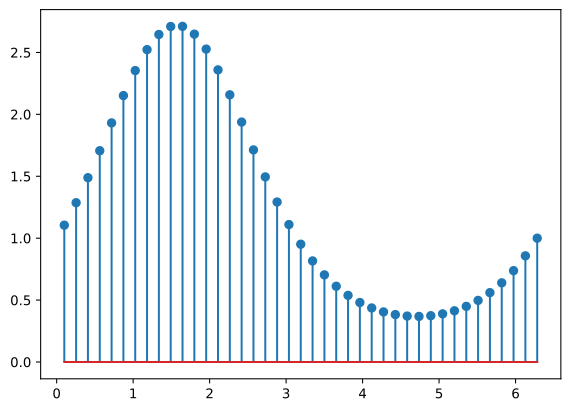
It is also possible to create figures from static images:

Tables (with label: @tbl-mylabel renders Table 1) can be generated with markdown as follows
| Tables | Are | Cool |
|---|---|---|
| col 1 is | left-aligned | $1600 |
| col 2 is | centered | $12 |
| col 3 is | right-aligned | $1 |
References are displayed as footnotes using BibTeX, e.g. [@computo] will be displayed as (Computo Team 2020), where computo is the bibtex key for this specific entry. The bibliographic information is automatically retrieved from the .bib file specified in the header of this document (here: references.bib).
As already (partially) seen, Quarto includes a mechanism similar to the bibliographic references for sections, equations, theorems, figures, lists, etc. Have a look at this page.
Advanced formatting features are possible and documented (including interactive plots, pseudo-code, (Tikz) diagrams, Lua filters, mixing R + Python in the same document), but are beyond the scope of this simple introduction. We point to several entries in this direction.
The Quarto web site for comprehensive documentation, including:
The template distributed with the Computo Quarto extension, which uses such advanced features.
Our mock version of the t-SNE paper, a full and advanced example using Python and the Jupyter kernel.
The previously published papers in Computo can be used as references.
@article{doe2026,
  author = {Doe, Jane and Doe, John},
  title = {Template for Contribution to {Computo}},
  journal = {Computo},
  date = {2026-08-02},
  doi = {10.5072/computo.0000},
  issn = {2824-7795},
  langid = {en},
  abstract = {Template for preparing a submission to Computo, using the
    {[}quarto journal
    extension{]}(https://github.com/computorg/computo-quarto-extension),
    the Jupyter kernel (Python user) and the environment files to set-up
    the dependencies. For a detailed, step-by-step guide on preparing
    your article, setting up the continuous integration and submitting
    it to Computo, please consult the {[}guidelines for
    authors{]}(https://computo-journal.org/site/guidelines-authors.html).}
}